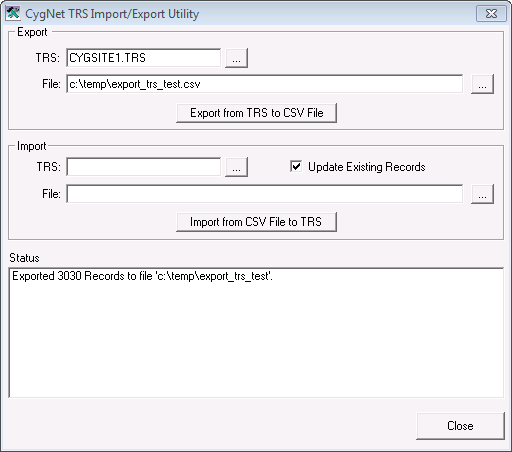
The CygNet TRS Import/Export utility provides a method for offline review and editing of Table Reference Service (TRS) tables. The source file is a .csv file and can be reviewed and edited using any text editor.
This utility does not delete records; it only adds new records or updates existing records. The CygNet TRS Import/Export utility can be set to auto run.
The CygNet TRS Import/Export Utility dialog box appears.
The CygNet TRS Import/Export utility is stored in the CygNet\Utilities directory (TRSLoad.exe) on the host server.
To install and launch (start) the application or utility using version management:
-OR-
Alternatively, browse to the CygNet\Utilities directory using Windows Explorer and double-click the program icon. You can also start an application or utility from a command line. These methods do not provide version management.
Exporting saves the tables to a .csv file. If the specified .csv file already exists, it will be replaced when the export is run.
The import command uploads tables to the TRS from a .csv file. The utility checks each line in the file for validity before uploading. The first row of the file is the header row. Each table entry record constitutes one successive row under the header.
The following table describes the .csv file format:
| Column | Description |
|---|---|
|
TABLE |
Table name (up to 8 characters) |
|
ENTRY |
Table entry (up to 10 characters) |
|
DESC |
Entry description (Up to 40 characters) |
|
CHILD |
Not used. |
To Export Facility Attributes
To Import Facility Attributes
The CygNet TRS Import/Export utility file (TRSLoad.exe) can be set to run automatically.
The command-line syntax for the utility is:
trsload /s [/u][-E <trs_name> <export_filepath>] [-I <trs_name> <import_filepath>]
| Parameter | Description |
|---|---|
|
/s |
Secret. Run TRS Load without showing the dialog box. This parameter is required to auto run. |
|
/u |
Update. On Import, update existing records. |
|
-E |
Export. Export from <trs_name> to <export_filepath> |
|
-I |
Import. Import from <import_filepath> to <trs_name> |
Example
|
trsload /s /u -I cygnet.trs c:\sandbox\trs.csv |
This would load the file trs.csv into the cygnet.trs in hidden, update mode.

|
|
|

